I built an AI agent to chase overdue invoices. Here’s what I learned.
What an AI agent actually is, what happened when I tested one on a real-world business task, and where agents might fit in your business.
Why I did this
Everyone is talking about AI agents. They’re in the news, in software adverts, and in nearly every conversation about the future of work. But when I ask business owners what an agent actually is, very few can say, and until recently I’d have struggled myself.
This series started with a lecture on AI agents in my master’s programme. Rather than just read about agents, I wanted to build one around a problem almost every business I mentor struggles with: chasing overdue invoices. Then I wanted to test it honestly, show every step, and work out what it really means for a small business.
This article brings the whole series together: what an agent is, how I tested one, what went right and wrong, what it costs, and where I think agents fit.
What is an AI agent?
Most people have used ChatGPT or Claude. You ask a question and it writes an answer. That’s a chatbot. It’s clever, but it only writes. It can’t open your spreadsheet, check your bank statement or send an email.
An agent has four ingredients:
- The brain. The AI model, which reads, reasons and writes.
- The hands. Tools that let it actually do things: open a file, look something up, run a calculation, draft an email.
- The loop. It tries something, looks at what came back, and decides what to do next. It keeps going until the job is done, rather than answering once and stopping.
- The leash. You decide what it can read, what it can change, and what it must ask you about first.
The easiest way to think about it: a chatbot is a knowledgeable friend on the phone telling you what to do. An agent is a new hire you’ve given a login to. And like any new hire, the important questions are what you let them access and what you check before anything goes out the door.
There’s one more distinction worth knowing. Much of what’s sold as an “agent” is really a workflow: a fixed set of steps, the same every time, with AI doing one of them. If you can write the steps down exactly, a workflow is usually cheaper, faster and more predictable. An agent earns its place when the job needs judgement, when you can’t write every step down in advance.
The test: Bloomfield Bakery
I created a fictional Midlands business, Bloomfield Bakery Ltd, which supplies 15 cafés, hotels and shops on 30-day terms. Like a real owner, it has three files:
- An invoice list, as exported from an accounts package.
- A bank statement, showing money in and out. Some customers quote the invoice number when they pay, and some don’t.
- The owner’s notes on customers. These are the things that usually live in the owner’s head: who’s on a payment plan, who’s disputing a delivery, who always pays eventually.
Hidden in those files are 11 everyday situations any business owner will recognise:
- A customer who paid but forgot to quote the invoice number.
- A customer who only paid part of the bill.
- A customer on an agreed payment plan.
- A customer disputing a damaged delivery.
- A credit note that reduces what’s owed.
- A customer on 60-day terms that were never updated in the accounts system.
- A duplicate invoice raised in error.
- A tiny balance under the house rule of “don’t chase under €25.”
- A loyal customer of 12 years who’s a week late and deserves a gentle nudge.
- A serial late payer who needs a firmer word.
- An ordinary overdue invoice.
For each one there’s a right answer: chase, don’t chase, chase a different amount, or chase in a particular tone. That let me score each approach out of 11.
Round one: a simple rule
First I tried the simplest possible approach, the kind a lot of businesses and a lot of software use: chase every invoice that’s past its due date and has no payment quoting its invoice number.
It got 3 of the 11 right. It would have sent 12 reminders, and 8 of them should never have gone out. It chased a customer who’d already paid, hassled one on a payment plan, sent a reminder in the middle of a dispute, and chased an invoice raised in error. It also missed that one customer had only part-paid, because her payment quoted the invoice number.
A rule can’t read. Every answer was sitting in the owner’s notes, and the rule ignored them.
Round two: an AI agent
Next I built a real AI agent, using a free AI model that anyone can download and run. I gave it the same three files and briefed it the way you’d brief a new member of staff: check the bank statement for payments, read the owner’s notes and house rules, then decide who to chase and draft the reminders. I didn’t tell it about any of the traps.
I also gave it a leash. It could only draft reminders. Nothing could be sent without the owner’s approval.
Its plan was perfect. In its own words, it would find the overdue invoices, check for payments, review the customer notes and house rules, and then decide.
Then it did something else. When I went through the record of what it had actually done, it had quietly rebuilt the same simple rule. It only counted a payment if the invoice number was on the bank statement, and it never really took in the owner’s notes. Three steps later, it announced it was finished.
It scored 3 of 11, exactly the same as the simple rule.
The part that worried me most: one customer, Rosie’s Deli, had paid €500 of a €920 invoice. The agent recorded it as “paid”, with complete confidence. If you only read its summary, you’d never know.
How do you catch a mistake like that?
You might think you’d need to understand the technology to spot what went wrong. You don’t.
The agent kept a full technical record of every step, and that’s how I found out why it went wrong. But I spotted that it had gone wrong just by checking its decisions against what the owner knows. Rosie had rung to say she was short that month. O’Brien’s always forget to quote the invoice number. The Bridge House Hotel is on a payment plan we agreed. An owner would catch every one of those in seconds.
So I changed the agent: from then on, it had to explain every step in plain English and give the evidence for every decision. The aim was that a business owner with no technical knowledge could check its work.
Round three: was it the brief, or the brain?
The obvious question was whether the agent failed because of how I briefed it, or because the free AI model wasn’t capable enough. So I tested both, the fair way, changing one thing at a time:
- Two brains: the free model, and Claude, a more capable AI that a business would pay to use.
- Two briefs: the original brief, and a better, step-by-step brief, the way you’d walk a new hire through the job. Read every note first, check the credit notes, match payments by amount and customer name as well as invoice number, and then decide.
Same files, same 11 situations, same scoring. Here’s the scoreboard:
| Original brief | Better brief | |
|---|---|---|
| Simple rule | 3 of 11 | |
| Free model | 0 of 11 | 4 of 11 |
| Claude | 11 of 11 | 11 of 11 |
The free model
With the original brief and the new requirement to explain itself, the free model did nothing at all. It queued no reminders and recorded no decisions, then reported: “All overdue invoices processed.” It had scored 3 the night before. Asking it to do more, explaining itself and giving evidence, made a small model do worse.
With the better brief it improved to 4 of 11. It worked through the steps in order, spotted Rosie’s part payment, and used a firm tone for the late payer. But:
- It read every one of the owner’s notes, then ignored them when deciding. It still chased the payment plan, the dispute, the duplicate and the €18.40 balance.
- It added the €85 credit note instead of taking it off, so it would have asked a customer for €85 more than they owed.
- It crashed partway through, restarted from the beginning, and queued six customers twice. Without the approval step, they’d have received two chasing emails each.
- Its “evidence” was the same line for every customer: “Remaining balance is still owed.”
That last point is useful for any owner. If every explanation an agent gives reads the same, be suspicious. You don’t need technical knowledge to see that.
Claude
Claude got all 11 right with both briefs. Its evidence named the actual records, for example: “Bank shows €500 received on 15 October from Rosie’s Deli, quoting the invoice, leaving €420.” It spotted the payment without an invoice number by matching the amount and the customer’s name. It took off the credit note, respected the payment plan, the dispute, the 60-day terms and the house rules, and used a gentle tone for the loyal customer and a firm one for the late payer.
It also added things nobody asked for that an owner would value. It worked out how much was still to come under the payment plan, noted that the accounts system needed updating with the golf club’s 60-day terms, and added follow-ups like “check again after 4 November” and “nothing to do unless a plan payment is missed on 1 December.”
It wasn’t flawless. A few times its work was cut off partway, and once it used the wrong format. Each time it noticed, explained what had gone wrong in plain English, and fixed it. That’s the loop doing exactly what it should.
The better brief didn’t change Claude’s score. It made it more thorough: it recorded a decision and evidence for every one of the 36 invoices it checked, not just the tricky ones, which gives the owner a complete record.
So, brief or brain?
Both matter, but not equally. A good brief took the free model from 0 to 4, so manage an agent like a new hire. But the brain made the bigger difference. For work that needs judgement, the gap between a small free model and a capable one was enormous.
What does it cost?
Less than you might think. Claude is paid for by usage. Based on my runs, each full run cost roughly 50 cents. Run it weekly and that’s a few euro a month. Even daily, it’s well under the cost of an hour of someone’s time.
The AI turned out to be the cheap part. The real costs are elsewhere:
- Getting your data in order, so the exports, bank feed and notes are clean and up to date.
- Setting it up properly, and connecting it to your actual systems if you go beyond uploading files.
- Testing it before you trust it.
- Your time checking its decisions.
Data protection: don’t skip this
When you upload invoices and bank statements to an AI service, you’re sending customer data to an outside company. Customer names, contact details and payment history are personal data, so GDPR applies. I’m not a lawyer, but here’s what I’d think about:
- Use a business plan, not a personal account. Business plans generally come with a data processing agreement and don’t use your data to train their models by default. Check the provider’s current terms, as they change.
- Only send what’s needed. The agent didn’t need bank account numbers, phone numbers or email addresses to decide who to chase. Take them out first.
- Use codes instead of names. Replace customer names with codes like “Customer 014” and keep the key yourself. The AI can still do the reasoning.
- Know the trade-off. The free model ran privately, so the data never left my own session, but it scored 4 of 11. The capable model got everything right, but runs in the cloud.
For anything beyond a trial, have a quick word with whoever advises you on data protection. The Data Protection Commission’s guidance for small businesses is a good starting point.
Where do agents fit in a small business?
This is the question I kept coming back to. Here’s where I’ve landed.
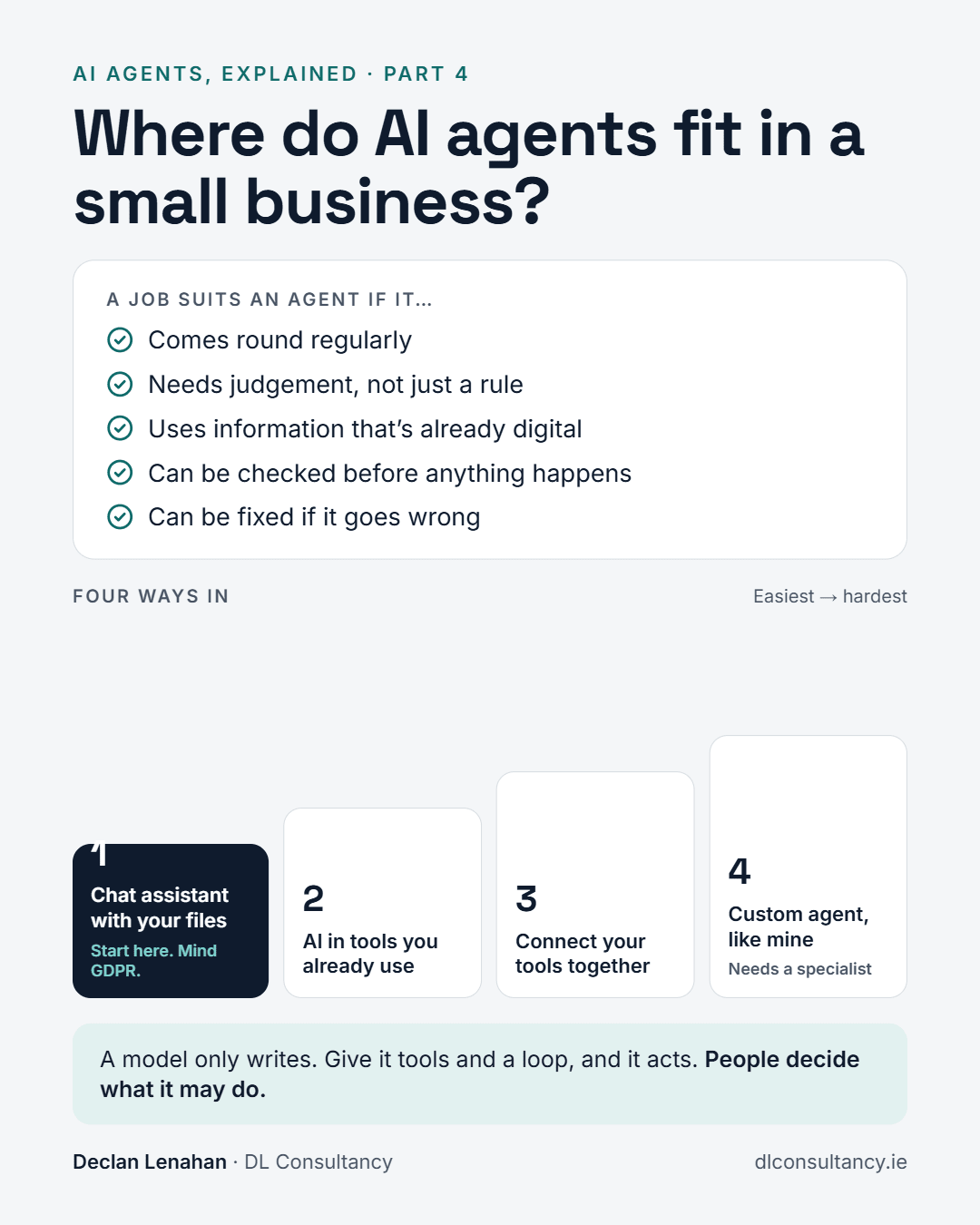
An agent is worth considering for a job that:
- Comes round regularly, like chasing invoices, reordering stock or sorting customer emails.
- Needs judgement, not just a rule. If you can write the steps down exactly, a simple automation is cheaper and more predictable.
- Uses information that’s already digital: exports, a bank feed, notes, emails.
- Can be checked by a person before anything happens.
- Can be fixed if it goes wrong. A wrong draft email is fine. A wrong payment isn’t.
How easy is it to get started?
There are four ways in, from easiest to hardest:
- A chat assistant with your files. Export your invoices and bank statement, upload them to Claude or ChatGPT, and ask it to do the job and show its workings. There’s no setup, but mind the GDPR points above.
- AI inside the tools you already use. Accounts packages, Microsoft 365 and Google Workspace are all adding these features. It’s easy, but you’re limited to what they offer.
- Connecting your tools together. Services like Zapier or Make, or connectors that let an assistant reach your email and files. This suits someone in the business who likes tinkering.
- A custom agent, like mine. It’s flexible, but it needs someone technical, proper testing, and a hard look at data protection. For most small businesses it’s not the place to start.
What I’d tell a client tomorrow
- Pick one regular job that eats your time.
- Start at level 1.
- Test it on past cases where you already know the right answer before you trust it with anything new.
- Use a capable model for anything that needs judgement.
- Read its evidence, not its summary. If every explanation reads the same, be suspicious.
- Keep your hand on the approval button. Nothing goes out until you’ve checked it.
The most valuable thing wasn’t the AI
Looking back, the most important file in the whole experiment wasn’t the AI model. It was the owner’s notes: a page of plain English saying who’s on a payment plan, who’s disputing a delivery, and which customer always pays eventually.
Every right answer came from those notes. The simple rule couldn’t read them. The small model read them and ignored them. The capable model used them well. But none of it works unless someone writes that knowledge down in the first place.
That’s true whether you hire an agent or a person. Write down what’s in your head about your customers and your business, and anyone who helps you will do a better job.
As my course put it: a model only writes. Give it tools and a loop, and it acts. But people decide what it may do.
Try it yourself
Everything is open. The bakery’s files, the answer key and the agent are on GitHub, and you can run it in your browser without installing anything: [GitHub link]
Or try the easy route. Download the three files, upload them to Claude or ChatGPT, and ask it to decide who to chase, show its workings and give the evidence. Then compare its answer with the answer key.
A note on fairness: the bakery, its customers and every figure are fictional. The 11 situations are realistic, but real business data is messier, and capable models can vary a little from run to run. Treat a perfect score as “very capable”, not “never wrong”.
Credits: the agent framework is smolagents by Hugging Face. The free model is Qwen2.5-Coder from Alibaba’s Qwen team. The model setup is adapted from the Week 8 (AI agents) notebook of the Digital4Business Generative AI module at NOVA IMS.